Back To Home

Draw Things LTX -2.3 Toolkit

One responsive control surface for frame planning and spatial upscaler math. Tune the values, preview the JSON, and copy parameters straight back into Draw Things without manual editing.

Mobile-friendly layout Bilingual UI One-tap JSON copy

For Apple Platforms

Mac iPad iPhone

Module 01

LTX-2.3 Frames Slider

Set the frame count, see the approximate duration at 25fps, and copy the exact JSON block used by Draw Things.

Credit by wetcircuit

11.67 s
Frames 297 Step size: 8 frames
Approx. duration 11.67 Rounded to nearest 1/3 second at 25fps
Minimum 1 Maximum 1401

JSON preview

Draw Things ready


Usage

  1. You can copy a single parameter, or copy the full combined JSON.
  2. Spatial Upscaler is optional. If there are two valid hi-res options, you can choose either one.
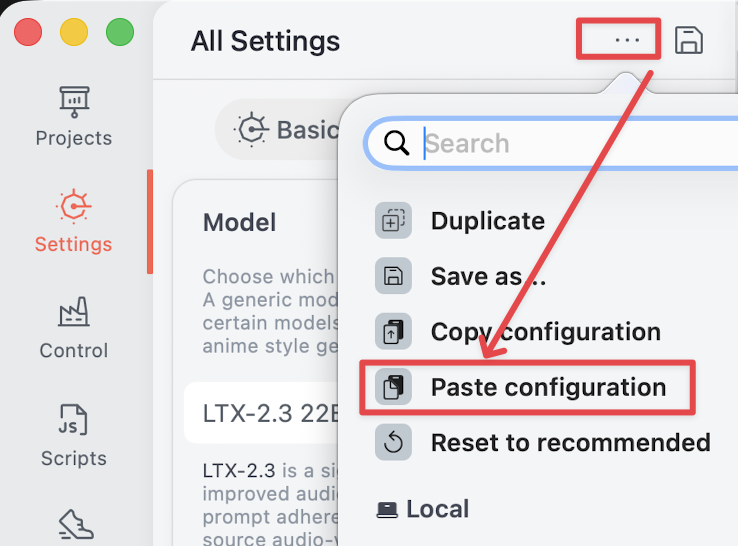
  3. After copying, open Draw Things, tap the three-dot menu in the top-left corner, then choose Paste configuration to update the matching settings quickly.
Module 02

Spatial Upscaler Autocalculate

Choose a target resolution, evaluate the valid hi-res fix sizes, and copy either the target size or a complete hi-res fix payload.

Credit by Eloyse

2 valid
Target size 1152×768 Original output size
Best valid option 576×384 Divide by 2
Include Spatial Upscaler
Turn this off if you only want frame count and target size in the final copied JSON.

Valid result options

64-grid checked